- How to Create an RSS Feed from a Google Alert
- Why Your RSS Reader May Fail to Read the Google RSS Alert You Created
How to Create a Google RSS Alert:
Should you want to eliminate all email notifications you receive from Google Alerts, you can set them up as an RSS feed and bundle them in one place.
In addition to e-mailing you the latest alert for your choden keyword, Google Alerts lets you send anything directly to a feed you already use. After you set up alerts as an RSS feed, you’ll no longer receive email notifications for that specific alert from Google.
If you have existing Google Alerts set up to send you email notifications, head over to your Alerts home page and click on the Pencil icon to edit its options.
If you haven’t already, you can set up a new Google Alert, click “Show Options” to get there instead.
Now, from the dropdown next to “Deliver To,” select “RSS Feed” and then click the “Update Alert” button.
After an alert has been converted into an RSS feed link, you’ll see an RSS icon next to it under the “My Alerts” section. An RSS feed icon will appear next to the alert you created.
Right-click the icon and then select “Copy Link Address” to copy the RSS feed URL to the clipboard.
Finally, head over to whichever RSS feed reader/aggregator you use, paste the URL, and add your Google RSS Alert to your feed. We use Feedzy for our showcasae.
Adding Google Alerts to an RSS feed is an easy way to view customized alerts generated by Google from a source you already use to receive up to date news and content. This is the best way to utilize Alerts without clogging up your email’s inbox.
What the Guides DON’T Tell You:
Once you have set up and pasted your RSS feed link into your favourite RSS News Reader or News Aggregator DO NOT go back and delete the RSS Feed link you created in your Google Alerts account.
Doing so will render the feed link invalid and you will have to set up your RSS hyperlinks all over again.
Have a look at how we used Google Alerts RSS and RSS from other sites to create news specific pages here:
- South Africa
- Bhisho
- Bloemfontein
- Cape Town
- Durban
- Gqeberha
- Johannesburg
- Kimberley
- Mahikeng
- Mbombela
- Pietermaritzburg
- Polokwane
- Today’s Fraud Alerts
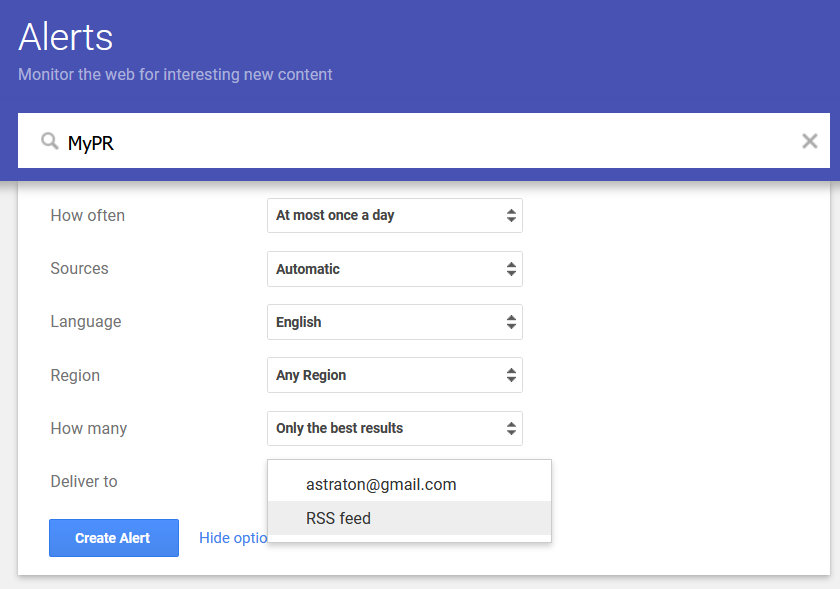
Creating a Google RSS Alert. Photo: MyZA

Video: What They Don’t Tell You When You Create an RSS Feed from a Google Alert
Boilerplate and Editor’s Notes.
More Info on What They Don’t Tell You When You Create an RSS Feed from a Google Alert here:
Twitter: https://twitter.com/MyPE
Facebook: https://www.facebook.com/MyZAco/
CLICK HERE to submit your press release to MyPR.co.za.
Read the full article by Alan Straton here: MyPR